Introduction
My photos live on an external HDD attached to a mini PC running Ubuntu. I use digiKam for tagging and culling — every edit it makes gets written to XMP sidecars alongside the camera originals. The HDD is shared over the local network.
On my laptop, I browse the library with XnView MP, which reads digiKam's XMP tags natively. XnView MP's album system becomes the source of truth for organizing photos into albums and tag-based collections.
The pipeline's job is to turn this file share into a static photography site — no database, no CMS, no manual exports:
- digiKam handles the creative work (rating, keywords, captions)
- XMP sidecars carry the metadata across machines
- XnView MP albums define membership via
.filelistexports - The pipeline extracts, enriches, catalogs, and publishes everything to a static Nuxt 4 site
Architecture Overview
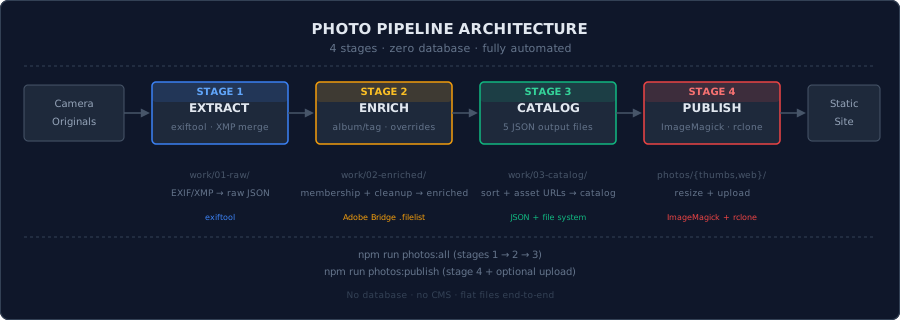
The pipeline runs on my laptop and reads originals from the HDD share. Four Node.js stages process them sequentially, producing resized image variants and JSON catalogs. The catalog files are committed to the repo; the image variants are uploaded to Hetzner object storage. At build time, nuxt generate compiles everything into static pages.
Stage 1: Extract
Source of Truth: Filelists
XnView MP can export .filelist files containing selected photo paths. The pipeline treats these as the sole source of truth:
filelists/
├── album-iceland-2024.filelist
├── album-slovenia-2025.filelist
├── tag-birds.filelist
├── tag-landscapes.filelist
└── ...
Each filelist determines membership. album-*.filelist entries become album members; tag-*.filelist entries become tag members. A stem in both album-iceland-2024.filelist and tag-birds.filelist gets albumIds: ["iceland-2024"] and tagIds: ["birds"].
Exiftool + XMP Merge
For each stem, the pipeline finds the original image (camera source root first, then a fallback photos/original/), locates the XMP sidecar that digiKam wrote, and runs exiftool -j -n on both:
const raw = await extractRawMetadata({
  imagePath: found.imagePath,
  xmpPath,
  stem,
  fileName: found.fileName,
  fallback
})
XMP fields take priority over embedded EXIF. This is deliberate: digiKam edits (titles, descriptions, keywords) should win over the camera's baked-in metadata. The output is one JSON file per photo:
work/01-raw/<STEM>/<STEM>.raw.json
Localized fields use keys like Title-en-US and Title-sv-SE, normalized into { en, sv } objects. A --fallback flag controls missing Swedish text: en-only nulls it out, mirror copies English.
Stage 2: Enrich
Stage 2 cleans up the raw extracts, assigns album/tag membership from filelists, and applies optional manual overrides.
Membership + Enrichment
The pipeline re-reads the filelists to build a membership map, then normalizes each raw record into a stable schema:
const enriched = {
  id: raw.source?.imageStem?.toLowerCase().replace(/[^a-z0-9]+/g, '-') || null,
  basename: raw.source?.imageStem || null,
  extension: raw.source?.imageFile?.split('.').pop()?.toUpperCase() || null,
  title_en: t.title?.en ?? null,
  title_sv: t.title?.sv ?? null,
  // ... 40+ normalized fields
  albumIds: Array.from(membership.albumIds).sort(),
  tagIds: Array.from(membership.tagIds).sort()
}
No field fabrication — missing data stays null.
Override System
Some metadata can't live in EXIF (poems, corrected GPS). The pipeline supports optional override files, validated against a JSON Schema:
work/overrides/<STEM>.overrides.json
Overrides merge last, so they always win:
if (overrides && typeof overrides === 'object') {
  for (const [k, v] of Object.entries(overrides)) {
    if (v !== undefined) enriched[k] = v
  }
}
A planned Stage 2.5 will use an LLM to auto-generate descriptions and poems, writing them as reviewable overrides.
Taxonomy Sidecar
Stage 2 writes a taxonomy index alongside the enriched records:
work/02-enriched/_taxonomy.json
This caches album/tag labels from filelist filenames so Stage 3 doesn't need to rescan the directory.
Stage 3: Catalog
Stage 3 assembles the enriched records into five web-facing JSON files.
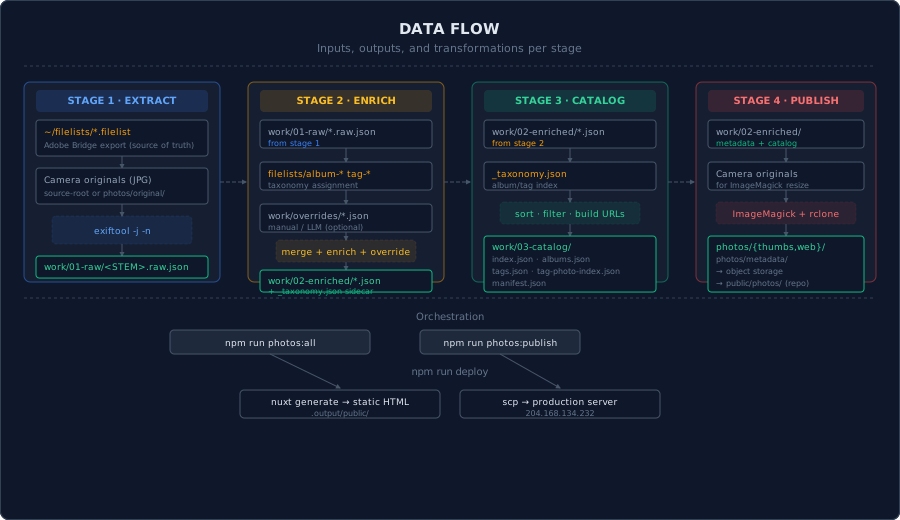
The Five JSON Files
| File | Contents |
|---|---|
index.json | All photos with full metadata — primary data source |
albums.json | Album taxonomy (id, label, order) |
tags.json | Tag taxonomy (id, label, order) |
tag-photo-index.json | Tag → photo ID lookup for fast intersection |
manifest.json | [{basename, extension}] — legacy fallback |
Asset URLs are built from a configurable base URL (defaults to the Hetzner object storage endpoint):
assets: {
  thumbnail: `${baseUrl}/photos/thumbs/${basename}.${extension}`,
  lightbox: `${baseUrl}/photos/web/${basename}.${extension}`,
  original: `${baseUrl}/photos/original/${basename}.${extension}`
}
Files are written to both work/03-catalog/ and public/photos/ (the repo mirror). This means Stage 3 alone is enough to refresh the website — no need to run publish for a catalog-only update.
Photos are sorted newest-first with a stable ID tiebreaker:
photos.sort((a, b) => {
  const da = a.date || ''
  const db = b.date || ''
  if (da !== db) return db.localeCompare(da)
  return a.id.localeCompare(b.id)
})
Stage 4: Publish
Stage 4 generates image variants, copies metadata, and optionally uploads to object storage.
ImageMagick Variants
For each stem, ImageMagick runs twice:
await run('convert', [
  found.imagePath, '-auto-orient', '-strip',
  '-resize', '480x480>', '-quality', '82', thumbOut
])
await run('convert', [
  found.imagePath, '-auto-orient', '-strip',
  '-resize', '2048x2048>', '-quality', '86', webOut
])
- Thumbnails: 480×480px, quality 82
- Web variants: 2048×2048px, quality 86
-stripremoves metadata for smaller files
Metadata Copy + Upload
Enriched JSON is copied into photos/metadata/<STEM>/<STEM>-metadata.json. Stale directories are pruned on full publishes. The --upload flag triggers a 4-phase rclone sync to Hetzner object storage:
- Thumbnails →
photos/thumbs/ - Web variants →
photos/web/ - Metadata →
photos/metadata/ - Catalog JSONs →
photos/*.json
Originals are opt-in (--upload-originals).
Frontend Architecture
The frontend is a Nuxt 4 app (SSR disabled, static preset). The photo gallery uses three composables.
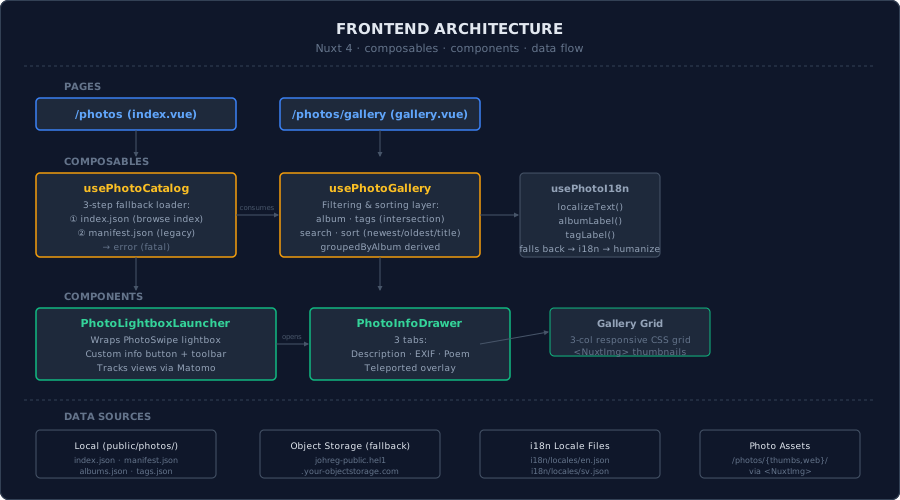
usePhotoCatalog — Data Loading
3-step fallback:
- Browse index —
index.json(primary, all data inline) - Legacy manifest —
manifest.json+ per-photo metadata - Fatal error — 500 page if both fail
The fetchJson helper treats HTML responses (SPA fallback pages) as failures even with a 200 status:
const ok = response.ok && parsedAsJson
Lazy detail loading via ensurePhotoDetails(photoId) fetches per-photo JSON only when the user opens the lightbox.
usePhotoGallery — Filtering & Sorting
Wraps the catalog with reactive filters: album, tags (intersection via tag-photo-index.json), text search (title, description, location, album, tags), and sort (newest, oldest, title).
usePhotoI18n — Localization
Catalog labels are { en, sv } objects. localizeText() returns the current locale's value with a fallback chain: catalog → i18n locale file → humanized slug.
PhotoSwipe Lightbox
PhotoLightboxLauncher wraps PhotoSwipe with a custom info button that opens PhotoInfoDrawer — a teleported overlay with three tabs: Description, EXIF (camera, lens, settings, GPS with OpenStreetMap link), and Poem. Photo views are tracked via Matomo with cookie-free first-party proxy.
File System Layout
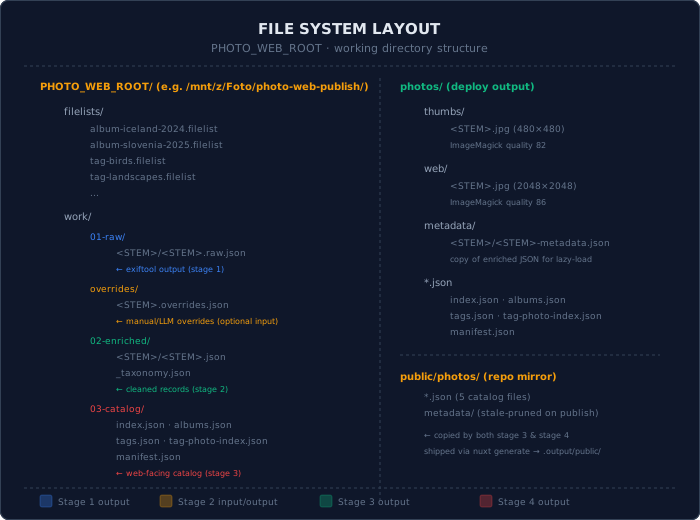
All pipeline data lives outside the repo in a working directory (/mnt/z/Foto/photo-web-publish). Only the catalog JSONs and metadata are mirrored into public/photos/ for the build. Image variants are uploaded to object storage and loaded at runtime.
Deployment
npm run generate
scp -r .output/public/* root@204.168.134.232:/var/www/me.joretec.com/public/
nuxt generate compiles everything in public/ into static .output/public/. SCP pushes it to a Hetzner VPS running nginx. No database, no cache invalidation, no CI — the whole site is ~2 MB.
What's Next
- LLM enrichment (Stage 2.5): Vision model generates descriptions and poems as reviewable overrides
- WebP/AVIF variants: Modern formats with
<picture>fallback - Incremental publish: Track changed stems, upload only new files
- Client-side search: Full-text search via Fuse.js
- Photo blog integration: Link photos to travel articles
Conclusion
The pipeline replaces a manual multi-tool workflow with four scriptable Node.js stages. Stateless, file-based, easy to debug and extend. ~800 lines of JavaScript for the pipeline, ~500 lines of TypeScript for the frontend. Not bad for a system that processes hundreds of photos and serves them in under a second.
All code is at github.com/johreg/me.joretec.com.